Smart Screen Interface Guide
Chapter 3 · Manual page 97
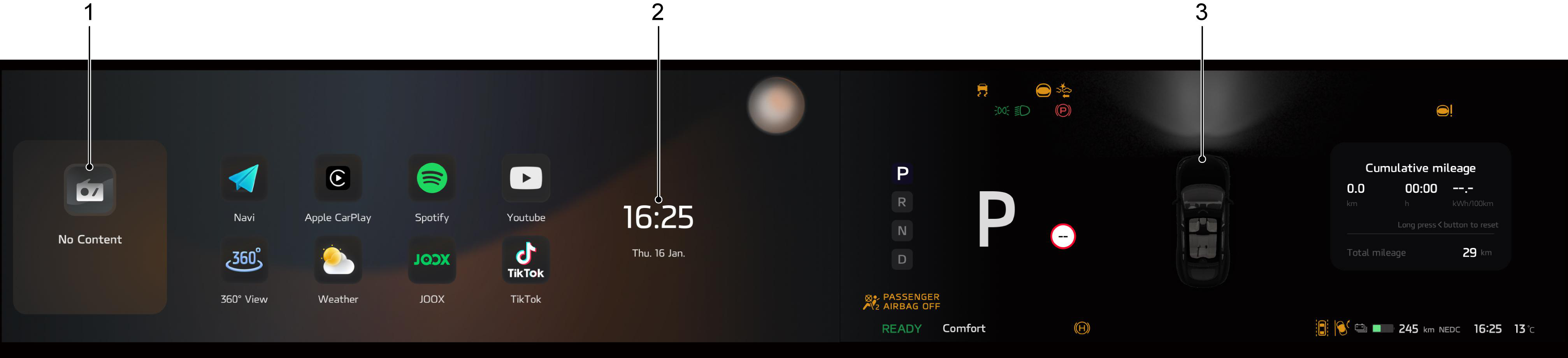 The half-screen interaction mode includes:
- Entertainment
- Time and date
- Instrument and Information
in respect of BSD: When the driver selects the left direction indicator, and the speed is below 12mph (20 km/h), objects and surrounding conditions detected by the front left blind spot area are displayed on the driver entertainment screen; when the speed is greater than 12mph (20 km/h), the objects and surrounding conditions detected by the rear left blind spot area are displayed on the driver entertainment screen. When the driver selects the right direction indicator, objects and surrounding conditions detected by the rear blind spot area are displayed on the driver instrument and information screen.
Dynamic Zone Tracking(DZT) : When the vehicle speed is lower than 18mph (30km/h) and the left blind spot image is triggered, pedestrians or non-motorized vehicles with collision risk will be marked with a red box in the blind spot image.